Difference between revisions of "Menu screen"
Jump to navigation
Jump to search
(Created page with "The '''menu screen''' is shown up in the main menu of ''Pokémon3D''. In the background, a map from Pokémon3D is displayed. These maps can be altered and replaced by editing ...") |
|||
| Line 37: | Line 37: | ||
File:MainMenuScreen.png|The main menu screen as of version 0.24. | File:MainMenuScreen.png|The main menu screen as of version 0.24. | ||
</gallery> | </gallery> | ||
{{Pokemon3D}} | |||
Latest revision as of 02:50, 11 February 2013
The menu screen is shown up in the main menu of Pokémon3D.
In the background, a map from Pokémon3D is displayed. These maps can be altered and replaced by editing the files in the \Pokemon\maps\mainmenu folder. On the top left is the current version or the debug info displayed while the word "Kolben" shows up in the lower left corner.



| Option | Description |
|---|---|
| Continue | Loads the game from the autosave folder. |
| Load Game | Shows up the load game screen where one can organize the save files. |
| New Game | Starts a new game. |
| Quit Game | Quits the game. |
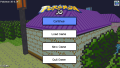
The main menu screen as of version 0.24.

|
|
|
Development cycle | Version history | Future versions |
|
Help | Controls | Launcher | Menu screen | Options | FAQ |
|
Technical | Savefile structure | Game Mods | Content Packs |