Difference between revisions of "Content Packs"
(added images) |
|||
| Line 6: | Line 6: | ||
File:content_packs_normal.png|Pokémon3D without any content packs. | File:content_packs_normal.png|Pokémon3D without any content packs. | ||
</gallery> | </gallery> | ||
== Installation == | == Installation == | ||
| Line 34: | Line 18: | ||
The files in the content packs are placed in relation to their actual position in the "Content" folder. If the texture "\Pokemon\Content\Textures\Texture1.xnb" should be replaced, one has to create the texture "\Pokemon\ContentPacks\yourcontentpackname\Textures\Texture1.xnb". | The files in the content packs are placed in relation to their actual position in the "Content" folder. If the texture "\Pokemon\Content\Textures\Texture1.xnb" should be replaced, one has to create the texture "\Pokemon\ContentPacks\yourcontentpackname\Textures\Texture1.xnb". | ||
=== Texture files === | ==== Texture files ==== | ||
Texture files are simple .xnb files containing a new texture to be displayed in-game. This can be a GUI texture, a in-game object texture like the door of a house or an NPC sprite. Even Pokémon animation textures can be replaced using the content packs. | Texture files are simple .xnb files containing a new texture to be displayed in-game. This can be a GUI texture, a in-game object texture like the door of a house or an NPC sprite. Even Pokémon animation textures can be replaced using the content packs. | ||
For HD texture packs, the game cannot automatically find larger textures. So one has to create a file called "exceptions.dat" that is located in the root folder of the content pack. This file contains single texture replacements, not the whole texture files. An example line: ''Textures\BarkTown|0,0,16,16|Textures\Cherrygrove|0,0,16,16''<br /> | For HD texture packs, the game cannot automatically find larger textures. So one has to create a file called "exceptions.dat" that is located in the root folder of the content pack. This file contains single texture replacements, not the whole texture files. An example line: ''Textures\BarkTown|0,0,16,16|Textures\Cherrygrove|0,0,16,16''<br /> | ||
| Line 42: | Line 26: | ||
</gallery> | </gallery> | ||
=== Sound and Music files === | ==== Sound and Music files ==== | ||
Similar to the texture files, the sound and music files are .xnb files. They only need their respective .wma file which contains the actual music or sound file. So for music and sounds, there needs to be two files for each track, the .xnb file and the .wma file. These have to be in the same location. | Similar to the texture files, the sound and music files are .xnb files. They only need their respective .wma file which contains the actual music or sound file. So for music and sounds, there needs to be two files for each track, the .xnb file and the .wma file. These have to be in the same location. | ||
=== Map files === | ==== Map files ==== | ||
The map files are maps that can replace or add maps to the story of the game. They are located in a folder called <code>\Pokemon\ContentPacks\yourcontentpackname\maps\</code>. To link to maps in the content packs, one doesn't have to add a path to the warps in the map files, the game finds them automatically when the content pack is registered in the <code>options.dat</code>. | The map files are maps that can replace or add maps to the story of the game. They are located in a folder called <code>\Pokemon\ContentPacks\yourcontentpackname\maps\</code>. To link to maps in the content packs, one doesn't have to add a path to the warps in the map files, the game finds them automatically when the content pack is registered in the <code>options.dat</code>. | ||
=== Script files === | ==== Script files ==== | ||
The script files are similar to the map files, they are only placed in another location called <code>\Pokemon\ContentPacks\yourcontentpackname\Scripts\</code>. Else, they work the same way as map files, one can add scripts to maps as if they were in the Scripts folder in the Pokemon folder if the content pack is saved in the <code>options.dat</code>. | The script files are similar to the map files, they are only placed in another location called <code>\Pokemon\ContentPacks\yourcontentpackname\Scripts\</code>. Else, they work the same way as map files, one can add scripts to maps as if they were in the Scripts folder in the Pokemon folder if the content pack is saved in the <code>options.dat</code>. | ||
== List of Content Packs == | == List of Content Packs == | ||
{{png|MCT}}]] = Music / Sounds | |||
{{png|TCP}}]] = Textures | |||
{{png|OCP}}]] = Other content | |||
{| class="wikitable" | {| class="wikitable" | ||
| Line 61: | Line 47: | ||
!width="400"|A | !width="400"|A | ||
|- | |- | ||
| | | {{png|MCT}}]] [http://pokemon3d.net/threads/659/ Anime music collection for Pokemon3D] | ||
|} | |} | ||
| Line 68: | Line 54: | ||
!width="400"|B | !width="400"|B | ||
|- | |- | ||
| | | {{png|TCP}}]] [http://pokemon3d.net/threads/898/ B2/W2 OverWorld Texture Pack 1] | ||
|} | |} | ||
| Line 75: | Line 61: | ||
!width="400"|D | !width="400"|D | ||
|- | |- | ||
| | | {{png|MCT}}]] [http://pokemon3d.net/threads/708/ Daziman's Epic HD Music Pack] | ||
|} | |} | ||
| Line 82: | Line 68: | ||
!width="400"|F | !width="400"|F | ||
|- | |- | ||
| | | {{png|MCT}}]] [http://pokemon3d.net/threads/993/ Final Fantasy Music Pack] | ||
|- | |- | ||
| | | {{png|TCP}}]] [http://pokemon3d.net/threads/1193/ First Content Pack for 0.23] | ||
|} | |} | ||
| Line 91: | Line 77: | ||
!width="400"|G | !width="400"|G | ||
|- | |- | ||
| | | {{png|TCP}}]] [http://pokemon3d.net/threads/461/ "Gold" styled UI Texture pack] | ||
|} | |} | ||
| Line 98: | Line 84: | ||
!width="400"|H | !width="400"|H | ||
|- | |- | ||
| | | {{png|MCT}}]] [http://pokemon3d.net/threads/330/ HGSS Music Pack] | ||
|} | |} | ||
| Line 105: | Line 91: | ||
!width="400"|P | !width="400"|P | ||
|- | |- | ||
| | | {{png|TCP}}]] [http://pokemon3d.net/threads/1179/ Perspective Fix] | ||
|- | |- | ||
| | | {{png|MCT}}]] [http://pokemon3d.net/threads/308/ Pokémon 3D GB Sounds Music Pack] | ||
|} | |} | ||
| Line 114: | Line 100: | ||
!width="400"|S | !width="400"|S | ||
|- | |- | ||
| | | {{png|TCP}}]];{{png|MCT}}]] [http://pokemon3d.net/threads/1246/ SemiHD Texture pack] | ||
|} | |} | ||
== Trivia == | == Trivia == | ||
* The loaded content packs are listed in the debug screen (F3). | * The loaded content packs are listed in the debug screen (F3). | ||
== Version history == | |||
{|class="wikitable" | |||
|- | |||
! Version | |||
! Changes | |||
|- | |||
| 0.23 | |||
| First implementation | |||
|- | |||
| 0.24 | |||
| | |||
* Multiple content pack support | |||
* fixed some GUIs aren't loaded properly with content packs. | |||
* Maps and scripts can be loaded through content packs | |||
|} | |||
{{Pokemon3D}} | {{Pokemon3D}} | ||
Revision as of 01:12, 7 February 2013
A content pack is a collection of graphics, music, sounds, maps and scripts to change the in-game textures, music and story. They are folders located in the ..\Pokemon\ContentPacks\ folder. They can contain various files, they have to be in the .xnb format to work. For maps and scripts, the file format is .dat. The game takes all content that is in the ContentPacks and replaces the original content with the found content. All content that isn't affected by the content packs is loaded normally.
Files loaded from a content pack don't actually replace the files in the Content folder, but rather gets loaded instead the files from this folder.

Pokémon3D with the "SemiHD" content pack.

Pokémon3D without any content packs.


Installation
Requirements
To install a content pack, the ContentPacks folder has to exist in your Pokemon folder. Also, the Save folder has to exists with an options.dat in it. This can be achieved by starting the game once and press F3 at least once and close the game again.
Install a content pack
After finding and downloading a content pack, copy the folder into the ContentPacks folder. After that's done, open the options.dat in the Save folder. There is a line called "ContentPacks|". Add the name of the folder of the content pack after the "|". If you want to load multiple content packs, you have to add more separated by a comma (","), e.g. "ContentPacks|UIPack,TexturePack,MusicPack". The order the content packs are sorted is actually important because if multiple content packs contain the same texture, the texture from the content pack that is listed first is loaded. The other textures are ignored.
File placements
The files in the content packs are placed in relation to their actual position in the "Content" folder. If the texture "\Pokemon\Content\Textures\Texture1.xnb" should be replaced, one has to create the texture "\Pokemon\ContentPacks\yourcontentpackname\Textures\Texture1.xnb".
Texture files
Texture files are simple .xnb files containing a new texture to be displayed in-game. This can be a GUI texture, a in-game object texture like the door of a house or an NPC sprite. Even Pokémon animation textures can be replaced using the content packs.
For HD texture packs, the game cannot automatically find larger textures. So one has to create a file called "exceptions.dat" that is located in the root folder of the content pack. This file contains single texture replacements, not the whole texture files. An example line: Textures\BarkTown|0,0,16,16|Textures\Cherrygrove|0,0,16,16
This line replaces the texture at 0,0 in the texturepack “Textures\BarkTown” with the same texture coordinates from the cherrygrove texturepack.
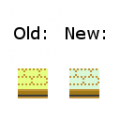
The difference between the texture packs.

Sound and Music files
Similar to the texture files, the sound and music files are .xnb files. They only need their respective .wma file which contains the actual music or sound file. So for music and sounds, there needs to be two files for each track, the .xnb file and the .wma file. These have to be in the same location.
Map files
The map files are maps that can replace or add maps to the story of the game. They are located in a folder called \Pokemon\ContentPacks\yourcontentpackname\maps\. To link to maps in the content packs, one doesn't have to add a path to the warps in the map files, the game finds them automatically when the content pack is registered in the options.dat.
Script files
The script files are similar to the map files, they are only placed in another location called \Pokemon\ContentPacks\yourcontentpackname\Scripts\. Else, they work the same way as map files, one can add scripts to maps as if they were in the Scripts folder in the Pokemon folder if the content pack is saved in the options.dat.
List of Content Packs
 = Music / Sounds
 = Textures
 = Other content
| A |
|---|
| Anime music collection for Pokemon3D
|
| B |
|---|
| B2/W2 OverWorld Texture Pack 1
|
| D |
|---|
| Daziman's Epic HD Music Pack
|
| F |
|---|
| Final Fantasy Music Pack
|
| First Content Pack for 0.23
|
| G |
|---|
| "Gold" styled UI Texture pack
|
| H |
|---|
| HGSS Music Pack
|
| P |
|---|
| Perspective Fix
|
| Pokémon 3D GB Sounds Music Pack
|
| S |
|---|
| ; SemiHD Texture pack
|
Trivia
- The loaded content packs are listed in the debug screen (F3).
Version history
| Version | Changes |
|---|---|
| 0.23 | First implementation |
| 0.24 |
|
|
|
|
Development cycle | Version history | Future versions |
|
Help | Controls | Launcher | Menu screen | Options | FAQ |
|
Technical | Savefile structure | Game Mods | Content Packs |